Thursday, June 21, 2012
Finally, Microsoft announces their "official" tablet... took long enough!
How about this! If you look at my last post on this blog before this one, you will see that it was about the rumors of the possible Microsoft "Courier" tablet. It's been what seems like forever (and in the electronics industry it pretty much is), but Microsoft finally came up with their own tablet!
Since I really no longer use this blog for posting, you can check out my personal opinion at my new blog VirtuallyGeeky.com
Friday, March 26, 2010
Microsoft Courier Tablet Device
Unfortunately, as of right now, this device could still be a myth, but there are some references that say Microsoft admitted to this device and in fact it will be out later in 2010. I’m not going to hold my breath, only because the device seems too good to be true. If you haven’t seen the articles that describe this device in some detail, even with videos, then I recommend you take a look!! It seems to be the only device so far that would be able to truly give Apple’s iPad a run for it’s money.
Engadget ran a recent article on March 5th, 2010, that shows two videos of this device. It also shows
While the iPad seems great…
If you watch the videos and see the Apple hype on the iPad, it looks like a pretty incredible device. Couple that with inexpensive wireless internet that is NOT locked into a contract, and it seems like it is the perfect device to compete with a Netbook… but it’s not (in my opinion).
Here’s Why:
Um, no Flash support – Are you KIDDING ME?? Steve Jobs touts the iPad as having “a better web experience than your laptop”… and yet, there is no flash support (as seen in his live keynote when he opens “The Wall Street Journal’s” web site and you see the lego block in the middle where there *should* be Flash), and being that Steve Jobs “hates” Flash and says it is the only thing that causes Mac’s to crash, you can bet that you will never see Flash support on the iPad (or the iPhone for that matter). Heck, I could see Steve trying to banish it from Mac computers and laptops at some point.
Walled Garden – What do I mean by a walled garden? Well, I mean
Wednesday, March 24, 2010
Let the public shaming begin! Opera Mini for the iPhone
Use Gmail to Generate Unlimited E-mail Addresses
More real world examples:
Find out who is spamming you: Be sure to use plus-addressing for every form you fill out online and give each site a different plus address.
Saturday, March 20, 2010
Tablets, Tablets everywhere
Wednesday, October 21, 2009
Where's my Movie Data?? - Media Management
Friday, August 7, 2009
iPhone: Mobile Air Mouse - On Sale
iPhone : Mobile Air Mouse: **Currently (as of 9:20am EDT 8/7/09) on sale for $2.99**
"Instantly transform your iPhone or iPod touch into an air mouse, trackpad, and wireless remote for your computer! Sit back and surf the web, browse your photo library or control your music player from the comfort of your couch. Our air mouse uses the built in accelerometer to translate your hand motions into mouse movements on your screen. It can also operate as a trackpad, allowing you to control your computer with a single finger.
Tuesday, July 14, 2009
Cloud Computing Conundrum
For the disaster part, they discussed the threat of someone targeting these "mega-hubs" where these datacenters and backbones are located, and the effect this would have on the country. I think there is some validity to this, but I feel like there is a decent amount of redundancy and fault-tolerance in this day and age. I see their point though. If you lose your internet connection, how do you retrieve your data?? If the company you have this data with folds, where does it go??
Because of my mobility and want for having my information everywhere AND always in sync (so one device doesn't have the latest copy when I'm not at that device but need that data), I have started to try and move ALL of my computing data into the cloud with services that
Saturday, July 11, 2009
IndyCar - Finally Refreshing
I started watching IndyCar only this year. At first I was truly upset to find them only running on ovals ( I thought they would mimick F1, but on US territory)… I just don't find that much fascination in oval racing, but it was still a bit better than Nascar. I guess it stems from my affinity for motorcycle racing which has ALWAYS been about right AND left turns.
I got into Formula One racing this year as well, as I've found more time to watch recorded TV. I've always benn a *fan* of F1 racing, but couldn't fit it in my schedule. This year has been awesome with Jenaon Button!! Both my son and I try to watch every race(from our DVR).
So, to finally see IndyCar having to race both right and left… it was very refreshing. I like it a LOT!!
-- Post From My iPhone via Blogpress
Wednesday, July 8, 2009
Moving Notebooks to the "cloud"... trying to do this with Evernote
I have been an Evernote user for a little over a year now, but I never really used it to its full potential. This may have been in part due to the fact that I had a BlackBerry for a while and there was no Evernote application for the BlackBerry (there is now of course). I recently bought an iPhone, and there is a pretty solid Evernote client for the iPhone. I also have been feeling the need lately for better organizing and mobilizing (is that even a word? - looked it up... it's a word, but not the definition I am using here) my notes. I suppose I have simply used email in the recent past, but that's not a great solution and is too cluttered (in my opinion), so searches tend to have a lot of junk I'm not interested in sifting through and wastes time. I have also used Microsoft OneNote for some things, but it's SOOO limited to a PC (or Windows Mobile device which I don't own any longer... and even that mobile app is lame for mobile notes access IMO). My main concern, similar to my Task Management Solution concerns, is that the solution needs to be ubiquitous and work on all of my devices... which dictates some form of web-based backend and syncing.Evernote seems to fit that bill, and since I have an account and notes already in it, I am deciding to experiment more with it and see if I can make it work better for me. I am trying to
Monday, July 6, 2009
TomTom for iPhone en route | Software | iPhone Central | Macworld
"There are also logistical issues. For example, because the iPhone doesn’t support background processes, any navigation app must shut down during phone calls, making real-time tracking difficult—something that doesn’t happen on a dedicated GPS unit, even one that includes telephony features."
This is the biggest drawback I've had with ANY phone based GPS application. I had the Verizon VZ Navigator on one of my phones in the past, and while it was a great GPS app, if you took a call or were on a call, GPS no workie. One time, I was on a conference call and wasn't familiar with where to exit on my trip. A while later I realized I MUST have missed my turn and had to hang up on the call and wait nearly 7 minutes for the GPS to reinitialize and find my location to then tell me that I essentially went 30 minutes out of my way... extending my trip by 1 HOUR!!! Ugh! I will never forget that mistake, and since have purchased a Navigon 2100max stand-alone GPS. The Navigon is truly awesome (none are perfect as far as I'm concerned) and has some incredible features. However, Navigon is pulling out of the US for both sales and map updates at some point in the not-too-distant future. They will be honoring the remaining subscriptions for map updates from their customers, but then that's it. What does this mean??? I'm not entirely sure, but I'm guessing I still have about 3 years of (up to date) life left in my GPS. Past that I have no idea, but technology changes pretty fast anyway and something better may come along by then.
For now, I will be staying away from any phone based GPS system/app. I think the Tom Tom package looks promising... but if it still means taking a call stops the function of GPS telling you where to turn, I don't want any parts of it.
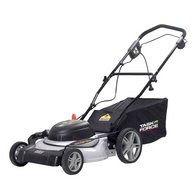
Going Greener (Electric Push Mower)
My gas-powered push lawn mower started to give me problems recently. I got it for free from my in-laws a while back and it's served me well (nice and light). The wheel adjustments were a BEAR though, sometimes requiring a hammer to adjust some of the wheels. The throttle seemed to have some issues as well, but it worked at any rate. Recently it ran out of gas, sputtering to a stop (normal) and I went to refill it. I accidentally over filled the gas tank by a little, and when I started it up, it was sputtering... almost identical to when it runs out of gas. My guess is something (dirt, whatever) was in the gas tank and got into the line or carb and is blocking the flow of gas. I tried slightly to see if I could track down the problem, but had no luck.My wife and I have wanted to get away from a gas powered lawn mower for some time now, and even went as far as increasing the landscaping in our front lawn to minimize the use of the lawn mower. So I saw this as an opportunity to possibly go greener (I was also thinking of getting the gas powered mower fixed). I started to look around to see what a new mower might cost in case it was not much more to buy new instead of getting it fixed. I saw electric mowers for hundreds of dollars (like $350+) and kind of wished we could get one, but just couldn't see putting out that kind of money. Then, I happened upon this Task Force Electric Push Mower at Lowe's for only $208!! So, I asked my wife, "What would you be willing to pay to go to an electric mower?" She started off saying we couldn't afford it... it would be great, but we just couldn't afford it. So I repeated the question with, "What would be your top $ we could afford?" She said, "$200." I said, "SOLD!" She couldn't believe it, and I couldn't either. So I went and bought it, and I have to say
To Jailbreak... or not to jailbreak: iPhone 3GS jailbreak “purplera1n” tool released - SlashGear
"The iPhone Dev Team may have held off on releasing their ultrasn0w iPhone 3GS jailbreaking and unlocking tool, but that hasn’t stopped long-time Apple hacker George Hotz. He’s released a tool called purplera1n which, while not unlocking the iPhone 3GS, does at least jailbreak it so that unofficial third-party apps can be installed."
I have been contemplating jailbreaking my iPhone 3GS, but up until recently there was no tool available to do it. The "iPhone Dev Team" is holding off on their release of ultrasn0w until 3.1 so Apple can't shut them down, which I have mixed feelings about. I think George Hotz has a valid point here:
“Normally I don’t make tools for the general public, and rather wait for the dev team to do it. But guys, whats up with waiting until 3.1? That isn’t how the game is played. We release, Apple fixes, we find new holes. It isn’t worth waiting because you might have the “last” hole in the iPhone. What last hole…this isn’t golf. I’ll find a new one next week. Also your purplera1nyday files ensure that you can always get back to a jailbroken state, so if you have it it’s just a matter of tools.” George Hotz
One point of clarification on this article... from the purplera1n web site, it looks like there is a OS X utility now. My main PC is Windows, so I don't have a quick easy way to check it out right now.
Now comes the decision of whether or not I chance it with my shiny new iPhone 3GS... hmmm. It would seem to me that it is pretty safe since you can restore from a backup... but if I were to brick my phone, I have no recourse and not enough money to buy a new one without a contract. I'd like to know from someone I trust that this works without issue (but there's always a chance something could go wrong).
Any takers??? ;-)
Wednesday, July 1, 2009
Appigo Todo and Toodledo… a dynamic duo!
I recently purchased both Appigo's "Todo" iPhone app (for $9.99) and Toodledo's Pro account (for $14.95/yr) which offers advanced features over the free account that were important to me. However, the free account itself is pr
etty spectacular, in the sense that every other web-based backend that works with an iPhone app charge you a yearly fee, and generally over $24.99/yr (which is what Remember The Milk charges for the account that works with its iPhone app or Appigo's Todo)! You, personally, may never need anything more than the free account from Toodledo, but I like what the Pro account offers in conjunction with what Appigo's Todo application offers with such grace and ease in their iPhone app. The most important to me being subtasks to create "projects" and "checklists", both which *require* sub-tasks (in all honesty, Toodledo can still handle this in the free version, but the subtasks show up as regular tasks. For you, it may not matter, but I like seeing where they are associated and also be able to hide them to remove the clutter). To demonstrate this, I suggest that you visit Appigo's site and watch some of the screencasts. It helped me better understand what the capabilities are, and is partially what sold me on this iPhone app over others. I also first downloaded the Appigo Todo Lite app, which is free, signed up for the free account at Toodledo and upgraded to the free 7 day trial of the Toodledo Pro account to check it all out together. The Todo Lite app only allows 10 tasks total, but it was enough for me to see the benefits over other solutions out there. By the way, checklists and projects seem to be considered 1 task for the limitation, but there is also a limit of about 5 subtasks for these in the lite version (NOT in the full version).I suppose I should give a little background on my situation regarding task management so you can better understand what I was looking for in a system. I've read
Friday, June 26, 2009
Fell off the grid for a bit... but got my new iPhone 3GS!!
Sorry I sort of fell off the grid for a bit. I've had a bunch of things going on that really didn't allow me to easily blog... but I've had things I've wanted to discuss. First of all, I got the new iPhone 3GS on June 19th!! WooHoo! I new this model was coming out before my first 30 days was up with AT&T, and I made sure I would be able to exchange my 3G for the 3GS when it came out. I only had to pay a $20 "restocking" fee to do it. I am EXTREMELY impatient, so I couldn't just sit it out and wait for the new model to release. I'm actually glad I did, because it allowed me to experience just HOW different and better the 3GS is to the 3G. I'm also glad that I upgraded my 3G to OS 3.0 before turning it back in. This allowed me to see that OS 3.0 most definitely had some performance improvements on the 3G, let alone the new feature set.
Most recently, I have been trying to find a solid task management system that I could use on both my iPhone and my PC (Windows, not Mac... but my wife has a Mac and I wanted something that was universal for the desktop). I'm pretty sure I finally found the right solution for this, so I will have a post on this specifically (hopefully over the weekend). In the meantime, there is a box on the top right of my main blog page that lists what I am using, with a link that has my referral number in it. If you decide to sign up for it, I'd sure appreciate you using my link so I get the benefits. ;-) I honestly would be happy paying for the service either way, so that should tell you how much I like it. I tried some others, and none of them had everything I was looking for, or were too expensive... or a combination of the two. I will discuss my findings and thoughts on these other services/apps in my review.
I want to get back to my app review series because I have found a lot of apps that are worth their price. So look for more in that area soon as well. Hopefully my Task Management System will help me along in this area! ;-D
Wednesday, June 17, 2009
iPhone OS 3.0 - Upgrade now or wait?
Now, not everyone experienced the same issues as me, and by the looks of things, a ton of peoe were able to get the update quickly and apply it without issue. Good for them... Seriously.
My upgrade process started at approx. 1:15pm, and consisted of the 3.0 download timing out in iTunes about 4 times. When it finally finished and began to apply to my iPhone, the update failed leaving my 3G in "Recovery Mode"... Nice. Apple's web site suggested I look for iTunes updates, or reboot my pc if there weren't any. Hey, at least they routed me here upon failure, so good on them. So I rebooted.
After reboot, iTunes recognized my phone was in recovery mode and suggested I restore... Uh, yes please. This time it worked just fine, but it took a while to complete. After it installed the 3.0 OS, it had to deactivate my phone... Here's where it got exceedingly annoying. Over 12 times it timed out with a "communication error" trying to communicate with the "iTunes Store"... Seriously?!? I had NO problem browsing the store. I think this where AT&T came into play, and I wasn't alone as others twittered their frustration too. At one point, my phone was activated, but it was STILL trying to connect for some reason. It eventually finished whatever it was trying to do.
Once this completed, it asked if I wanted to restore from a backup... Uh, yeah... Duh!
The restore took quite a while, and I'm not sure what it did during this time, because I STILL had to sync all my shit back to it!! Literally, there was nothing but stock 3.0 shit pn there... WTF? so I tell it to sync... Now I was down to about 100MB free on my 8GB iPhone, so that's a lot of info to sync, but I can't even believe how long it took to sync. I even decided to drop a ton of apps to shorten the time it would take.
When all was said and done, it was 5:32pm!!! Are you kidding me? That was painful. That's 4 hours of my life I would like back. I guess that's what I get for wanting to get it ASAP. ;-)
I just hope it's not as painful when I get my 3G S!!
-- Post From My iPhone
Tuesday, June 16, 2009
FriendFeed has my attention
I currently have it pulling in blogger, FaceBook and Twitter content from people I am following. I am now seeing content from these people that I wasn't seeing before... so A+ from me!
Monday, June 15, 2009
iPhone App Review Series
This first post in this series will be a quick summary of some of the apps I've come to like/love. I hope to do much more in-depth reviews of specific apps as I use them and my phone more. So look for more in this series.
Games:
I want to lead this category by saying that I don't have a ton of time to game on my phone. Because of that, games that I find to be challenging and offer some life may not provide this to someone who has hours at a time to game on their phone. I've read some reviews from people saying they beat the game in 2 hours or whatever... If you are one of those people, my reviews may not be the best for you.
Real Racing, by Firemint (genre = Racing) - This came out a few days ago and looks to be the best racing sim game so far. I haven't had a chance to play it much yet, but the graphics and depth of the game appear to be second to none. I will review this in more depth at a later date.
Fieldrunners, by Subatomic Studios (genre = Tower Defense) - This is a more classic style Tower Defense gameplay model where there is a blank canvas for you to layout the path to force the AI to follow to their doom. ;-) This style of Tower Defense is a LOT of fun, and can play different based on how you lay out your towers. Tower Defense has become one of my favorite genres lately, and this game does NOT dissappoint. I started off on Medium and failed the first level. I like that, because it tells me it will challenge me and stay interesting! I should say that what I am calling level 1 has (I believe) 100 waves of "runners". These included helicopters that didn't have to follow my path of death, and it also included tanks which can take a LOT of firepower before dying. I got defeated by wave 40. Obviously, I need a better strategy for the choppers and tanks, since they are the only things that got through. One EXTREMELY nice feature of Fieldrunners is the ability to pause your game, even exit and resume a pauses game. This is a must have for any phone based game, but I don't believe most have it.
Star Defense, by Ngmoco (genre = Tower Defense) - This game has some beautiful graphics and great gameplay. You are at a 3D planet with a path that the alien invaders will follow, and in certain areas the path will loop and come near to the other side of it, so placing one tower can get both sides. I only played one world and on Easy, and I got through it easily... But I've been playing Tower Defense games for a bit and understand the strategy, so I should probably never play them on easy.
I think I'll stop here for my first post in this series. I will talk about other types of apps besides games... Like the app I'm using to post this to my blogger account, BlogPress. So far I really like it, but I want to use it more before reviewing it.
-- Post From My iPhone
Saturday, June 6, 2009
Roku - STILL loving it to death!!! Honestly
I am still completely in love with my Roku player... maybe even MORE so than when I bought it! I literally use it almost every single day.From what I can tell these days, the XBOX 360 is as good a player as the Roku, and actually will be better shortly as they release some better feature set for the 360 and Netflix... but I am hopeful they also bring this to the Roku player as well. The feature I am referring to is the ability to browse the Netflix instant play library and add to your queue DIRECTLY FROM THE 360!!! That's huge! I actually bought an app for my iPhone to be able to add to my queue without having to visit a PC... but I'd much rather do it from my device when I'm ready to watch.
At any rate, if you are looking for a device like this and do not already have an XBOX 360 in the room you want this feature, the Roku for $99.99 is a KILLER DEAL! I highly recommend it to anyone, and am very happy I spent the money on it.